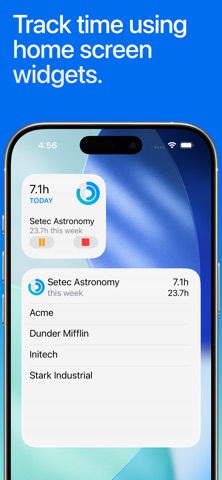
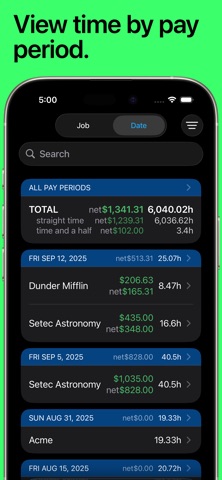
QUICK AND EASY time entry and editing make time tracking painless • Record time using timers, complete with support for Breaks and Pauses, including automatic breaks • Track your pay, including Tips, Mileage, and flexible ± time and earnings adjustments • Pick any time to start, stop, break or pause the timer (7 minutes ago, 10 minutes from now, whatever you need) • Set job locations to get clock in and out reminders when you arrive or leave or fully automate your time tracking (geofencing) • Manually enter time entries with minimal effort thanks to smart, adaptive defaults • Enter comments of any length with your time entries and optionally include them in your exports • Control timers, dictate comments, and apply tags using your Apple Watch ADVANCED FEATURES and customization set HoursTracker above the rest • Automatic daily and weekly overtime earnings calculations • Built-in reports by Day, Week, and Month and support for most common pay period schedules • Robust tagging and filtering allow you to build your own custom views • Reminders when you've worked your target number of hours per day (even takes time rounding into account) • Automatic time rounding: up, down, or to nearest (including 6 min) • Easily copy an existing job or time entry to save time and effort • Reminders you to clock in on your selected work days • Today Widget for at a glance time and pay monitoring • CSV and formatted text export via e-mail or the iOS Share Sheet • Passcode lock (with Touch ID & Face ID support) helps keep your HoursTracker data private • Cloud-based backup/restore with one re-usable backup slot included free (free account sign up is required) • Web-based reporting access, including charts, graphs, desktop exports, and rolling backups available with optional subscription • Customize your HoursTracker experience in the Preferences section under the More tab. Choose only one or many jobs clocked in at a time, opt-into prompts for comments, choose an elapsed time format (hours:minutes, or decimal hours), and more "Free Edition" stores up to 3 jobs and 21 days of entries. For unlimited entries, subscribe to "Premium" (up to 5 jobs) or "Unlimited" (unlimited jobs). Or, erase older data and continue to use the "Free Edition" until you're ready to buy. Visit our website at http://www.hourstrackerapp.com to learn more, and follow @HoursTracker on Twitter or facebook.com/HoursTracker to hear about upcoming features first. hourstrackerapp.com/privacy hourstrackerapp.com/terms www.apple.com/legal/internet-services/itunes/dev/stdeula