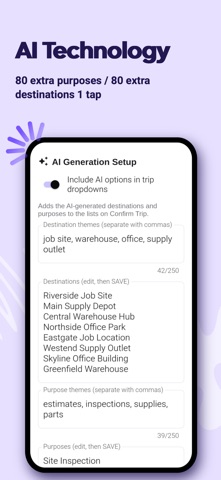
The Automated AutoLog app keeps your business mileage and vehicle expense records — entered by you, tracked by GPS as you drive, or built from your yearly odometer readings — and turns them into clean, ready-to-share reports. A journey that originally started back in 1997. GPS TRIP TRACKING • Start a trip with one tap: Business, Commute or Personal • Miles (or kilometers) keep counting with the screen locked • Live speed, and a map that turns with your direction of travel • An alert when you reach your destination, then confirm the trip in seconds • No signal? Trips save on your phone and upload when you're back online • Forgot to end a trip? The Forget Switch saves it after 10 minutes parked TRIPS, VEHICLES AND EXPENSES • Any number of vehicles, each with its own yearly settings • Saved and AI-suggested destinations and purposes, so a regular trip takes one tap • Enter Mi/Km to add or fix trips • Vehicle expenses by category, in your own currency • Odometer photos, with year-end reminders to take them STATISTICS • Spending by category and month, distance by business, commute and personal, and cost per mile • Fuel economy (MPG or L/100 km) and EV charging efficiency from the fuel and kWh you log UPCOMING SERVICES • Oil changes, tires, registration and more, due by date or mileage • One reminder when a service comes due; saving the expense resets it REPORTS • Mileage and expense reports as PDF and CSV • Cover sheets with business and personal totals • Saved reports you can reopen at any time • Regenerate reports for this year and the past four years as often as you need — no extra cost, no per-year fees FULL AUTOMATION Didn't log during the year? Enter your yearly odometer readings, work days and personal share, and AutoLog builds a mileage log from them. MILES OR KILOMETERS Set each vehicle to count in miles or kilometers. PLANS, FREE TRIALS AND SUBSCRIPTIONS Choose the plan that fits how you work, and move up any time. Nothing you've entered is lost. • Basic: vehicles, expenses, Enter Mi/Km to add and edit your trips, odometer readings and photos, and PDF and CSV reports, plus Statistics and Upcoming Services • GPS: everything in Basic, plus GPS trip tracking, AI destination and purpose lists, and the Beep and Forget switches • Automated: everything in GPS, plus Full Automation Try Basic free for 30 days, or GPS or Automated free for 3 days, with no purchase and no payment details. A free trial never turns into a subscription by itself. Basic and GPS can be paid monthly or yearly; Automated is paid yearly. Subscriptions renew automatically until you cancel. Payment is charged to your Apple ID account at confirmation of purchase. A subscription renews unless it is cancelled at least 24 hours before the end of the current period, and your account is charged for renewal within 24 hours before the end of the period. You can manage or cancel it at any time in your App Store account settings. PRIVACY Your records are private to your account. No ads, and we never sell your data. You can delete your account and everything in it from inside the app. Privacy Policy: https://docs.google.com/document/d/e/2PACX-1vTNVJhB4xKLLxtb_c936hInC0O01yAHATkPPVe7oTbg2jbv7HjMgOTUklOQRX7pkRY7KDkA4a-WOKT0/pub Terms of Use: https://docs.google.com/document/d/e/2PACX-1vQ99ssqJBV1Fda3QmaXK9fNsbA23VHdjJxMjdXOe2OQj4QVQNkjBd1emScwNQ1lIPqv9bwzvs-cMG_J/pub