TrayMinder: Aligner Timer

TrayMinder: Aligner Timer

By TrayMinder LLC

  • Category: Medical
  • Release Date: 2017-12-13
  • Current Version: 15.7.1
  • Adult Rating: 17+
  • File Size: 168.49 MB
  • Developer: TrayMinder LLC
  • Compatibility: Requires iOS 18.0 or later.
Score: 4.7
4.74407
From 5,267 Ratings

Description

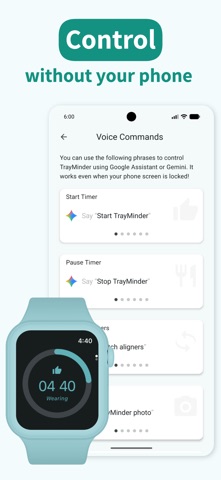
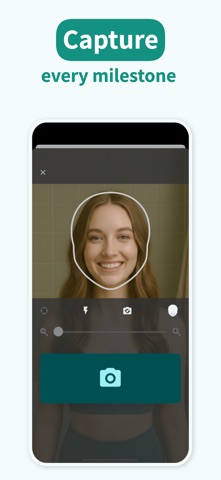
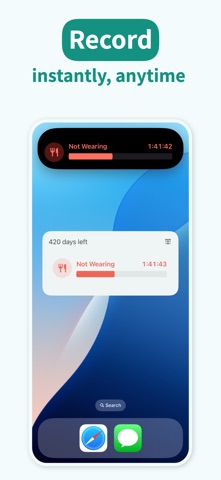
Built by an orthodontist, TrayMinder® helps you stay on track with your clear aligners, like Invisalign®, ClearCorrect®, Angel Aligner®, and others, so you can get the best possible results from your treatment. Your treatment is an investment. Your wear time protects it. Staying consistent helps you stay on schedule and avoid unnecessary delays. TrayMinder® gives you the tools to stay on track every day. ⎯⎯⎯⎯⎯ TIMER • Start/pause timer to track daily aligner wear • Automatically adjusts for time zones and daylight saving — no mental math • Share wear data with your doctor via email or text • Set reminders to put your trays back in after meals CALENDAR • Get notified when it’s time to switch aligners • Add reminders for orthodontic appointments • Add daily notes (e.g., pain, rubber bands, etc.) • Visualize your progress with a color-coded calendar TEETHIE® (Teeth Selfie) • Snap a photo with each tray change to track progress • Import existing photos from your library • Scroll through and watch your smile transform • Create side-by-side comparison photos • Make time-lapse videos to visualize your full treatment journey TREATMENT & RETAINERS • Track your clear aligner treatment from start to finish • Start a refinement when your treatment plan changes • Continue using TrayMinder® with Retainer Mode after active treatment • Back up and restore your treatment data ⎯⎯⎯⎯⎯ TRAYMINDER FREE Everything you need to track your aligner wear. Supported by ads. TRAYMINDER+ The best TrayMinder experience. No ads. More tools. More ways to stay on track. TrayMinder+ includes: → No ads → Home Screen widgets → Siri voice commands & shortcuts → Unlimited Teethie photo storage → Live Activities on your Lock Screen and Dynamic Island → Apple Watch support to track wear time from your wrist → Calendar sync for aligner changes and appointments → Multi-device sync for your wear time, treatment plan, and photos Protect your smile investment and get the most out of your aligner treatment. ⎯⎯⎯⎯⎯ © 2026 TrayMinder LLC. All rights reserved. All product names, trademarks, and registered trademarks are the property of their respective owners. All company, product, and service names used in this app are for identification purposes only. End User License Agreement: https://www.apple.com/legal/internet-services/itunes/dev/stdeula/ Privacy Policy: https://trayminder.com/privacy

Screenshots

Reviews

  • Ads! Ads! Ads!

    2
    By tmiantsoko
    Helps me keep track of my aligner wear time! Also, great and frequent updates. Loses a lot of points because of how much the ads get in the way of editing data and how hard it is to exit the ads once the timer is up. If you don’t want people to use your app for free, don’t offer a free option. Best way to avoid ads is to start and end timer accurately; the app and the ads within them can be annoying for forgetful people like me. I’m only human!
  • Ads never go away

    1
    By Krisna!
    The app itself works OK. However, the ads go on for minutes and you have to interact with them many many times before a way to close the ad appears. Seems like a violation of App Store policies. Very disappointed.
  • Riddled with ads now

    1
    By Pudu Fawn
    This used to be a functional app, but it is so riddled with ads now that it has become unusable. Full screen unskippable ads every time you try to do something, often glitching and replaying nonstop with no way to close. Deleting
  • App doesn’t work

    4
    By Nellissssssss
    Update: the issue was fixed. After the latest update, the app freezes on the main screen and becomes completely unresponsive.
  • just what i needed-

    5
    By Mambo141
    My compliance with my Invisilign retainers vastly improved once I started using Tray Minder. it is intuitive and easy to use, and the alarms are critical to help me remember! Definitely recommend-
  • Lost all data after last update

    1
    By Ducksfan78
    I had Tray Minder since I started my treatment in January 2026. The last update was extremely glitchy and couldn’t save any of my recent progress pictures. I had to uninstall and re-install the app and now all data is lost. I an extremely disappointed as I paid to have a service and now all records are lost. I am also unable to see if my re-installed app is still linked to my paid subscription
  • Great App, Responsive Team

    5
    By DeRaffe
    I started with Invisalign’s app, but found it lacking. After a few weeks I switched to TrayMinder and have been quite happy with it. I’ve been using it for nearly a year now. Recently, I had some thoughts on how I thought it could be even better, and I was surprised to see a feature I wished for get implemented (total hours tracking per tray being more readily visible).
  • Buggy After Recent Updates

    1
    By johnso777
    I was really happy with Tray Minder until the recent rapid fire updates, which have left it an unusable, buggy mess. I can’t even view my progress photos anymore, which is a core part of my treatment routine. Please chill with the vibe coding or introduce a QA process to review it.
  • Updated version is buggy

    3
    By taraelyse
    Was loving this app but the recent updated version has made it a lot worse. It’s slow, glitchy, and all the changes are for the worse. I need to restart it constantly and the icons are not responsive to touch. Pulling up the right day is next to impossible since it’ll randomly go to other days. It isn’t responsive when I try to add or edit a time. Very frustrating
  • The app needs optimizations

    3
    By Einholen
    I only use the timer, push reminders, and daily/weekly/monthly stats. These straightforward features used to be snappy and work great, but UX has been getting worse and worse with recent updates. It takes several seconds to start or stop the timer, or edit when I started/stopped it - used to be instantaneous.

Comments

keyboard_arrow_up

Buy this script Now!