Square Appointments: Scheduler

Square Appointments: Scheduler

By Block, Inc.

  • Category: Business
  • Release Date: 2015-08-27
  • Current Version: 7.23.2
  • Adult Rating: 4+
  • File Size: 786.02 MB
  • Developer: Block, Inc.
  • Compatibility: Requires iOS 16.0 or later.
Score: 4.8
4.8784
From 195,291 Ratings

Description

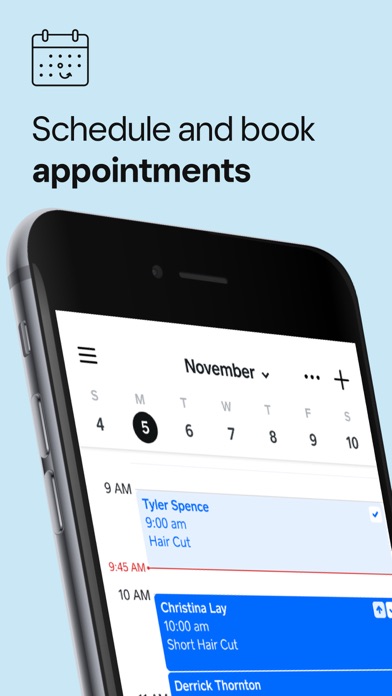
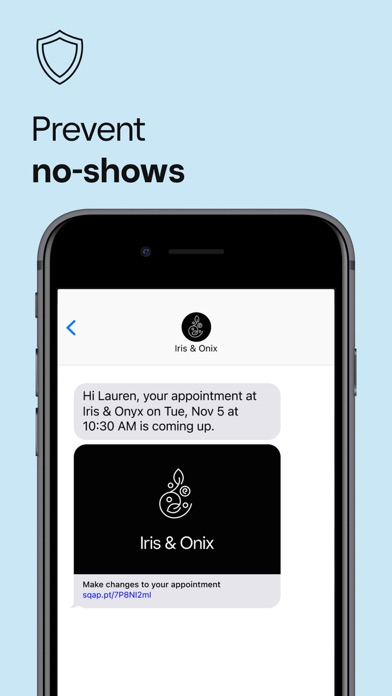
Square Appointments is an all-in-one solution for booking and scheduling appointments, sending reminders, and accepting payments. ► THE ALL-IN ONE POINT OF SALE FOR BOOKING, PAYMENTS, AND MORE It has everything you need to run your business from anywhere: online booking that’s easy for you and your customers, a point of sale that tracks customer details, and a secure, fast payment system. There are three monthly plans: Free, Plus, and Premium, and each is on a per-location basis. Custom pricing is available for businesses that process over $250K in annual revenue. ► NO CREDIT CARD REQUIRED, NO LONG-TERM COMMITMENTS Get 24/7 online booking, automatic appointment reminders, seamless payment processing, and no-show protection with Square Appointments for iPhone, iPad, and desktop. This is especially beneficial for barbershops and nail salons that need to manage appointments efficiently. ► PRICING PLANS TO FIT YOUR BUSINESS Pricing for Square Appointments is based on the features that fit your business best. There are three monthly plans: Free, Plus, and Premium, and each is on a per-location basis. Custom pricing is available for businesses that process over $250K in annual revenue. ► LET CLIENTS BOOK 24/7 No website? No problem—Square Appointments includes a pre-built booking site, so your customers can book anytime, from anywhere. Easily manage and accept bookings from your iPhone or iPad. With our Square Online integration, you can customize layouts, colors, and fonts that reflect your brand and even add pages for products, testimonials, and more. This feature is perfect for nail salons and barbershops looking to enhance their online presence. ► CHECK OUT CLIENTS SEAMLESSLY Accept payments, sell products, or send invoices easily, all from one app. Let customers have Square save their card on file for even faster checkout. ► REDUCE NO-SHOWS Set up automated appointment reminders, request prepayment or charge a cancellation fee for online booking. ► MANAGE AN ENTIRE TEAM EASILY Manage your whole team’s calendars, set their access and permissions, and see individual sales and appointment reports all from one place. ► GET TO KNOW YOUR CLIENTS Keep notes on all your clients so you can keep track of their preferences, appointment and sales history. This is valuable for barbershops, nail salons, and health & beauty businesses aiming to provide personalized services. This is more than just a calendar. Square Appointments is powerful appointment scheduling, a point of sale, and payment processing—all in one place.

Screenshots

Reviews

  • Great App

    5
    By Kayagold11
    I've been using square for years and for the most part, it runs smooth. I've had a few hiccups but were solved by calling customer service and they are always nice and professional and solve every issue. So for now, I'm sticking with square!
  • Features

    4
    By Jesssssss24
    I enjoy using this app, very reliable & the free features you’re able to use is definitely worth using. Some of the paid features should be included in the free package but overall it’s nice to use. Better than some other platforms.
  • From Bustillo Mobile Detailing

    5
    By Catracho916
    I’m new to self employment and running my own schedule as well as booking the jobs can be challenging. Square appointments has definitely been a huge help to when scheduling, keeping track of appts, and even collecting payment. Will probably upgrade to their plus option eventually! Thank you square
  • Easy to use

    5
    By One man cowboy
    Thank you, Square for this appointment schedule It’s very easy to use specially when your one-man barber
  • Roxane Shuz

    5
    By Roxane Rodgers
    Fabulous, absolutely gorgeous!
  • can’t respond to your own clients

    1
    By rondonald mcdonald
    Imagine an app where your own clients/new clients initiated contact to you through its own message system asking a question & you can’t answer the question because the app says i need consent from the customer to answer their question THEY reached out about. WELCOME TO SQUARE! The error prompts you to contact support if it’s not marketing and support will tell you that is the law!! no way around it but these geniuses haven’t heard of implied consent or know I DONT NEED CONSENT TO ANSWER A CLIENTS QUESTIONS. DONT USE SQUARE
  • Love it

    5
    By La cubanita Linda !!
    Super helpful with staying organized, simple as well
  • Dark Mode unacceptable

    2
    By sfbrian
    Recent update matching device system theme automatically is unacceptable. I want my phone in dark mode not your app. Dark mode does not distinguish colors of imported calendars between pending appointment making it difficult to know what is pending. There is no reason for your app not to have a setting feature to select between a light (typical) setting and dark or to mirror my phones setting.
  • Square dark mode makes the app nearly unusable.

    1
    By Myveriousuniverse
    Square suddenly started following my iPhone’s system dark mode, and there doesn’t seem to be any setting in the app to change the display mode independently. My iPhone is intentionally set to Dark Mode, but I do NOT want Square to be in Dark Mode. The entire UI, including the schedule/calendar, is now black, making appointments and different sections extremely difficult to distinguish. It has become very difficult to use for managing my business. Why was this changed without giving users an option to choose their preferred display mode? If the app is going to follow the phone’s system setting, there should at least be an option to override it within the Square app. Please give users the ability to choose Light or Dark Mode independently. This is seriously affecting usability.
  • New update

    1
    By BreyanaBastian
    The decision to automatically mirror light and dark mode to your device, without having an option to turn it off in the app setting was a bad decision, please make a setting where you can toggle light/dark mode in app

Comments

keyboard_arrow_up

Buy this script Now!