Photomator – Photo Editor

Photomator – Photo Editor

By Apple

  • Category: Photo & Video
  • Release Date: 2019-04-09
  • Current Version: 3.4.15
  • Adult Rating: 4+
  • File Size: 787.00 MB
  • Developer: Apple
  • Compatibility: Requires iOS 17.0 or later.
Score: 4.5
4.54854
From 3,832 Ratings

Description

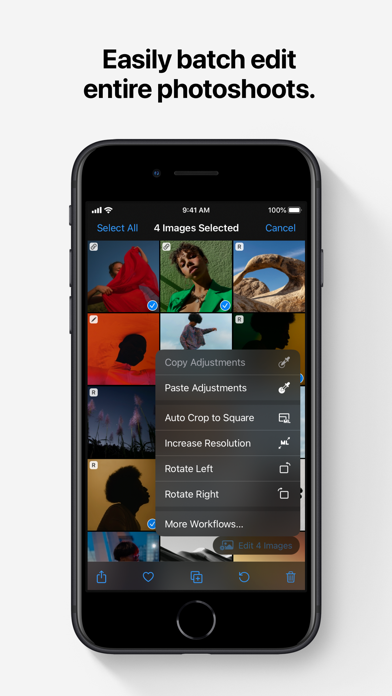
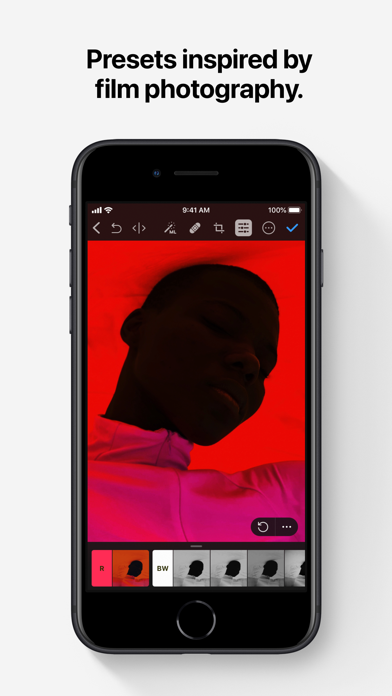
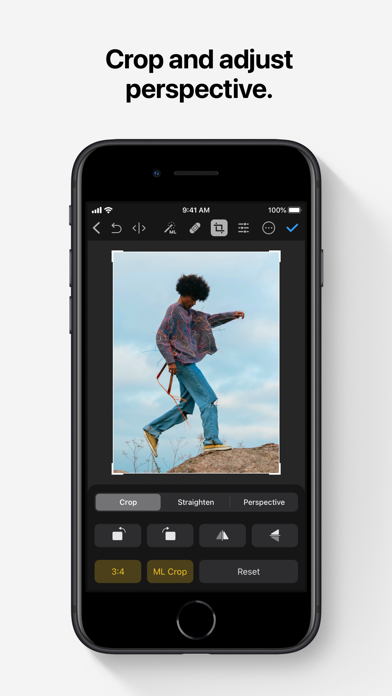
Photomator is the most powerful photo editing app ever designed for a mobile device. It includes an extensive collection of cutting-edge color adjustments, automatic selections powered by AI, support for over 750 RAW image formats, a magical Repair tool for removing unwanted objects, and many more powerful features, letting you enjoy pro photo editing anyplace, anytime. Everything you need to make your photos look incredible • Edit photos using a wide collection of powerful, nondestructive color adjustments • Quickly make precise subject, sky, and background selections in photos using AI, add gradient masks, and easily make selections using a brush • Effortlessly remove unwanted objects using an incredible object removal tool • Crop, straighten, rotate, and adjust the perspective of photos with an easy-to-use Crop tool • Instantly increase the resolution of photos using AI • Remove camera noise and image compression artifacts with the powerful Denoise feature • Magically remove color banding and increase color depth in photos with the AI-powered Smart Deband feature • Make your photos stand out with photographer-designed presets for landscape, black and white, and other photography styles • Easily copy and paste edits between photos or batch edit even hundreds of photographs at a time • Open and edit over 750 RAW image formats, including Apple ProRAW and compressed Fujifilm RAWs • Follow all the changes you make in the beautiful live histogram Tools powered by AI • Select the subject, sky, or background in a photo with just a tap • Improve the quality of photos by reducing camera noise with the AI-powered Denoise feature, intelligently upscale photos with Super Resolution, or magically remove color banding and increase color depth using Smart Deband • Automatically enhance shots using a machine learning algorithm trained on 20 million pro photos, or fine-tune individual adjustments, like White Balance, Selective Color, or Color Balance with a single tap • Intelligently crop photos using the AI-powered auto-cropping • Copy the look of any photo to another using the incredible Match Colors feature State-of-the-art color adjustments • Enjoy powerful tools for effortlessly adjusting the temperature, tint, exposure, contrast, brightness, hue, saturation, and vibrance in your photos • Recover incredible amounts of detail in the highlights and shadows of photos • Magically enhance fine details and structure in photos using powerful Clarity and Texture adjustments, or adjust textures in the highlights, midtones, and shadows separately • Selectively edit individual color ranges with Selective Color, or improve the balance of colors in the shadows, midtones, and highlights with Color Balance • Adjust lighting and colors with full precision using Levels and Curves adjustments • Mix the balance of the red, green, and blue color channels to create intense color effects in your images • Replace any color with any other using the Replace Color adjustment • Create beautiful black and whites even from your color photos • Use a range of additional adjustments, like Sharpen, Fade, Grain, Color Monochrome, Sepia, and Invert to make your photos stand out • Instantly change the look of photos with LUTs or export custom LUTs to use in other apps Compatibility • Automatically sync every change back to your Photos or Files browser • With the support for iCloud Drive, enjoy seamless edit syncing across Mac, iPhone, and iPad • Photomator is built from the ground up for iPhone and iPad with a native design that blends seamlessly with the sleek and modern look of iOS and iPadOS 18 • Photomator uses powerful Apple technologies like Metal, Core ML, and Core Image to deliver staggeringly fast performance, even when editing large RAW photos or batch editing multiple images at a time • Privacy policy: https://www.apple.com/legal/privacy/en-ww/

Screenshots

Reviews

  • It was good

    2
    By litoroc
    It is clear that Apple purchased this company to gut technology for their own use and kill the software. This app is slowly stopping to work. Previews are not loading, slow in converting photos, and it is slow opening files.... these changes are with each iOS update. If I did not have a lifetime license I would be looking elsewhere. Shame it was a great software.
  • iPad App will not rate photos

    3
    By SandritterProductions
    In an attempt to move away from Lightroom and use only an iPad Pro, Photomator seemed to be exactly what I needed. The reviews were great, and everyone spoke very highly of it. I do enjoy using the App. It COULD be a full replacement for Lightroom, but the iPad version is missing one crucial feature - photo rating. It’s near impossible to cull photos in this app without a rating/flagging system. Fix this one basic issue, and I’ll gladly update my review to 5 stars.
  • Can’t even use it

    1
    By nverlee
    Just downloaded this, right out of the box it’s unusable. The crop menu constantly closes itself and the color adjustment menu constantly scrolls itself back to the top. There are many reports of this being a known bug on online forums and few reports of potential solutions.
  • Generally good

    2
    By KevinCossaboon
    There is so much of this program that seems to be ‘just take what we give you’ - Workflows - Excellent, well, export does not support watermark. Turn of the banner on set films, rocket science. Right click a photo to export, no, you need to go to a menu for that. The App is solid, and it fells like a iPad app moved to the Mac verse an app built for the power of the Mac.
  • A photo editor I can justify

    5
    By E3frmle
    I'm a serious hobbyist, not a pro, and I can't justify a monthly subscription for photo editing. Then I found Photomator as a one-time purchase. What luck! It handles RAW files cleanly, Denoise has rescued shots I'd given up on, and batch editing saves me hours. I also own Pixelmator Pro outright for the occasional layers-and-text job. Great software at a price that makes sense for someone like me.
  • Masking

    4
    By Rwener
    Really wished Photomator had better masking capabilities. Otherwise really like it, and like that it isn’t a subscription.
  • iPad version vs. Mac Version

    1
    By rascatifamily
    This app would be perfect if I could rank and cull photos stored on external drives. I do not want to import my images into the Apple photos library to use all of the features of this app. The desktop version of this app works perfectly. Not sure why the basic functionality of the app changes when using the iPad version. Note that I do realize that there are always differences between the two platforms but in this case the iPad version is effectively worthless in working with external drives. I’ve called Apple support a couple of times and while they tried, the call ultimately ended with a “we just bought this company and we’re not familiar with how the software works at this point” responses. I’d be happy to give this app an higher rating if you can share with me how to rate/flag and delete photos from within the app on my iPad Pro. Thank you.
  • Pulled me from Lightroom

    5
    By Croatoanian
    Finally - something that’s affordable for a normal person that can replace Lightroom! Once I figured out a workflow, I’ve been very happy with it. I absolutely love how I can adjust the preview thumbnail size, which is something Lightroom can’t do. I also love how easy it is to batch edit and export. Two things I would love to see improvement on: File management system (folders for different events…. Not tied to Apple Photos), and better RAW processing (I seem to have a little more grain in my pictures with Photomator vs. Lightroom). Overall though, very happy with it and I don’t regret the change.
  • Promising

    2
    By Shotgecko
    For a novice photographer, this is all I need. All the controls I would use in Lightroom are easily found here and I find it much more intuitive to manage photos over other apps. My one gripe is this bug where when working in the color adjustments tab, it will periodically jump to the top of the menu, even when I’m actively adjusting another setting. Similarly, it closes the crop menu mid crop on accession. This kind of bug is an absolute flow killer. I’ve seen some posts online about how you just need to wait it out but at that point, my attention span and motivation is gone. I don’t understand how a bug like this can exist for as long as it has and until it’s fixed, I can’t recommend the app.
  • Batman Beyond

    5
    By The World’s Finest
    The Zeta Project

Comments

keyboard_arrow_up

Buy this script Now!